Delete Your Newspresso Account
Last updated: May 21, 2026
You can permanently delete your Newspresso account and all associated data directly from within the app. No need to contact support. The option is available in your Account Settings.
How to delete your account
- Open the Newspresso app on your device.
- Tap the Profile tab in the bottom navigation bar.
- Tap Account Settings.
- Scroll down and tap Delete Account.
- Confirm the deletion when prompted.
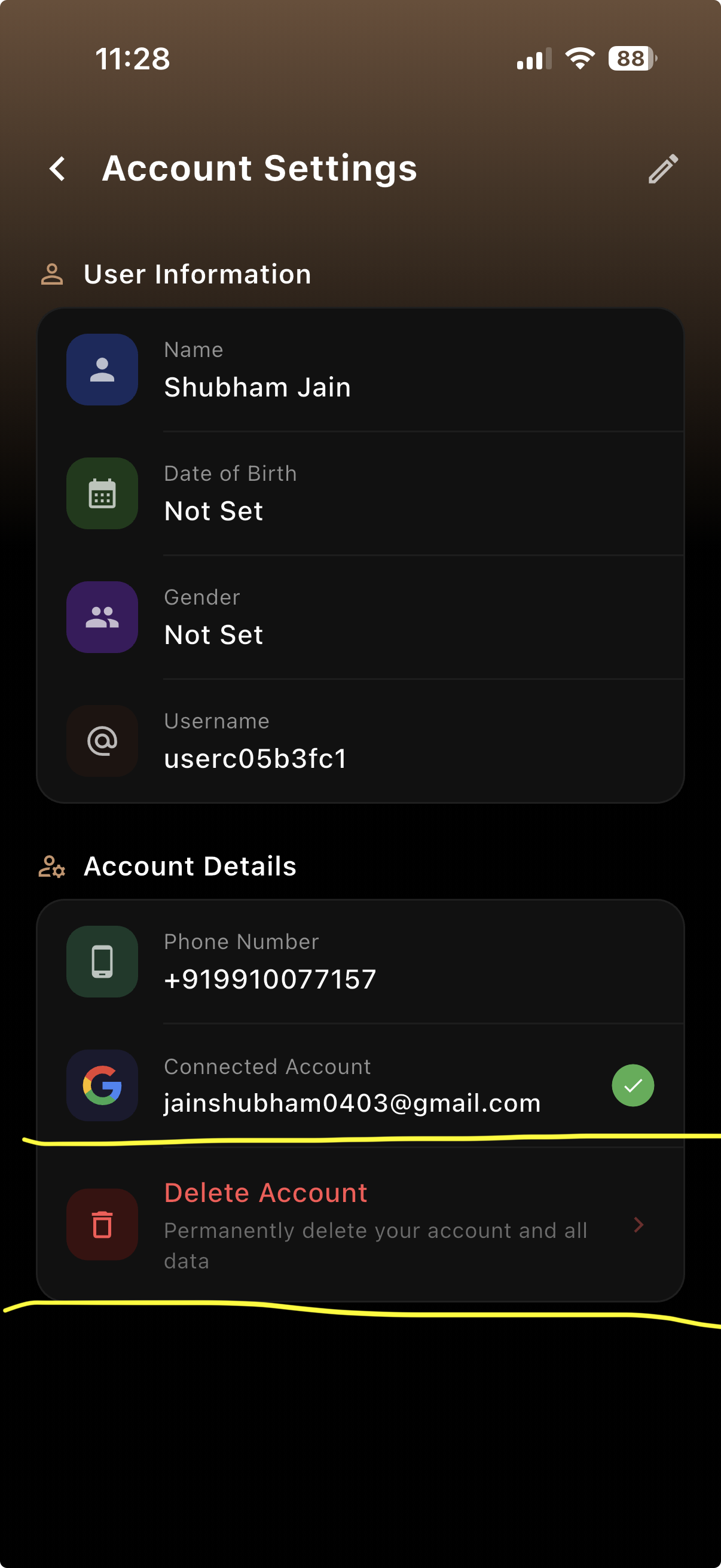
Account Settings: tap "Delete Account" to begin.
What data is deleted
Upon confirming deletion, the following data is permanently removed:
- Your profile (name, username, date of birth, gender)
- Phone number and linked Google account
- Reading history and article preferences
- Saved articles and favourites
- Streak data and Brewdle game history
- Notification preferences and FCM tokens
- Podcast unlock history
Timeframe
Account deletion is processed immediately upon confirmation. All personal data is permanently purged from our systems within 30 days.
Need help?
If you experience any issues deleting your account, contact us at hello@newspresso.org.