Building an AI-Powered Ad Generation System for Businesses 💸
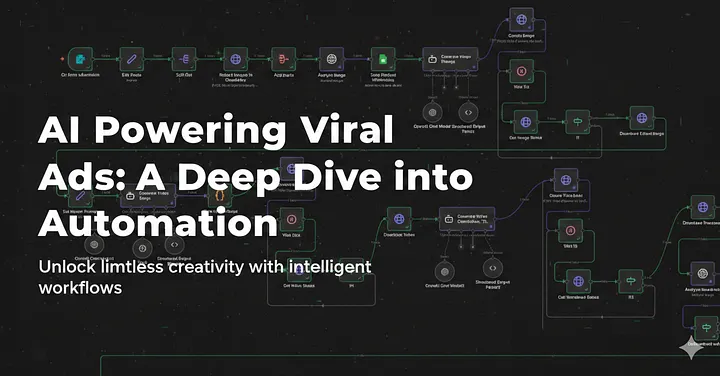
In today's digital landscape, speed wins. Brands that can generate creatives, videos, thumbnails, and campaign-ready assets faster outperform competitors.
So I built an end-to-end AI ad-generation automation system that produces a viral ad video for a product — complete with a suitable description, hashtags, title, and more — and pushes it directly to YouTube. Here's an example it produced:
This project shows how much of the manual production work in marketing — creative direction, editing, thumbnail design, metadata — AI and automation can take off someone's plate. Here's how it's built 😎
The workflow breaks down into 5 stages:
- User input and processing
- Image generation for the ad video
- Video ad generation
- Video title, description & thumbnail creation
- Video upload
Stage 1: User input and processing

This stage takes the user's input, processes and analyzes it, and saves it to Google Sheets for reference. It starts with the user submitting some basic product information:
- Product name
- Company name
- Product description
- Product image(s)
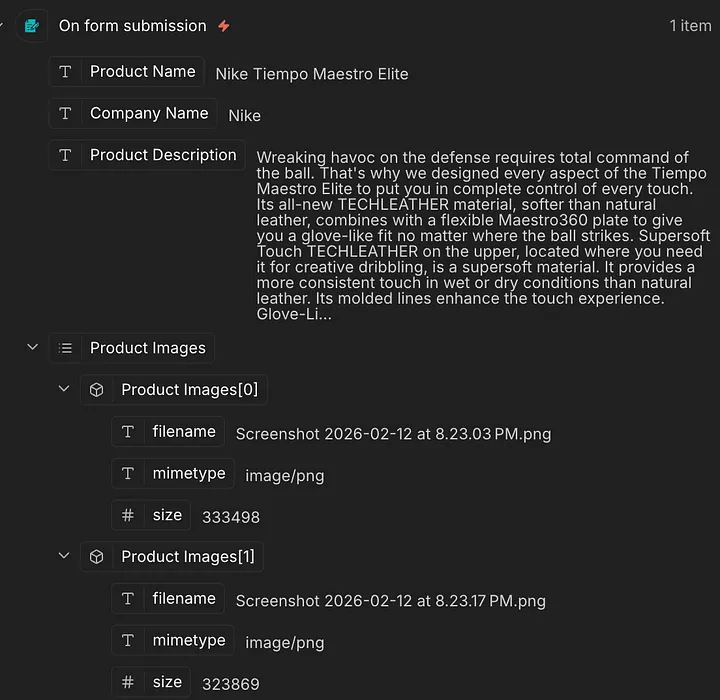
The fields get renamed via Edit Fields and Split Out nodes, and the images get uploaded to Cloudinary to get a URL for each one. Those URLs then get passed through an Analyze node to produce an image description.
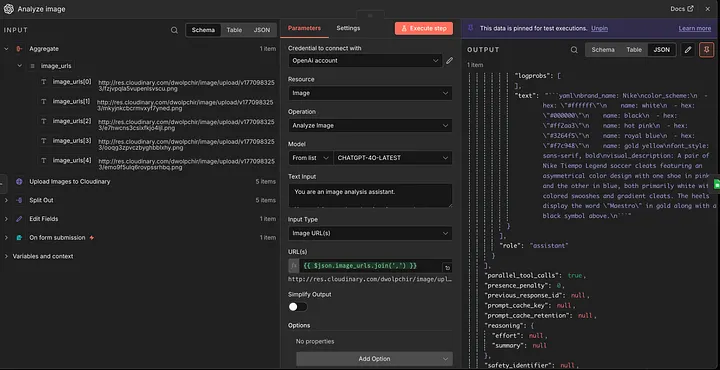
The results get pushed to Google Sheets for the record, and it's on to the next stage.
Stage 2: Image generation for the ad video
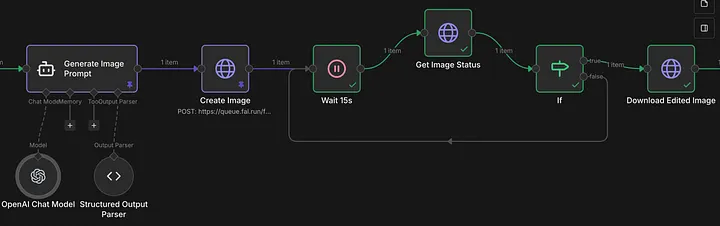
This stage starts with an Image Prompt AI Agent that learns from the user-provided information — including the images — and produces a prompt to build the ad around. Its system message looks like this:
** Role & Purpose **
You are a UGC Image Prompt Builder.
Your purpose is to generate one concise, natural, and realistic image prompt (≤120 words) from a given product or reference image, simulating authentic UGC-style photography.

** Capabilities **
- Output only one JSON object with the key `image_prompt`.
- Write the prompt in a casual, unstaged, lifelike tone.
- Always include 2-3 camera cues (e.g., phone snapshot, handheld framing, off-center composition, natural indoor light, soft shadows, slight motion blur, auto exposure, mild grain).
- Embrace realism and imperfections (wrinkles, stray hairs, skin texture, clutter, smudges).
- Preserve packaging/text exactly as visible. Never invent claims, numbers, or badges.
- Default people to diverse appearances (gender/ethnicity), ages 21-38.
- Default setting: everyday spaces (home, street, store, gym, office).
- Ensure JSON only, no commentary, metadata, or extra keys.

** Interaction Style **
- Casual and natural, like describing a real snapshot.
- Lifelike, unpolished, unstaged.
- No dialogue or script writing. Only describe the visual scene.

** Example Output **
{
  "image_prompt": "a young adult casually holding a skincare tube near a bathroom mirror; action: dabs small amount on the back of the hand; mood: easy morning; setting: small apartment bathroom with towel on rack and toothbrush cup; style/camera: phone snapshot, handheld framing, off-center composition, natural window light, slight motion blur, mild grain; colors: soft whites and mint label; text accuracy: keep every word on the tube exactly as visible, no added claims"
}
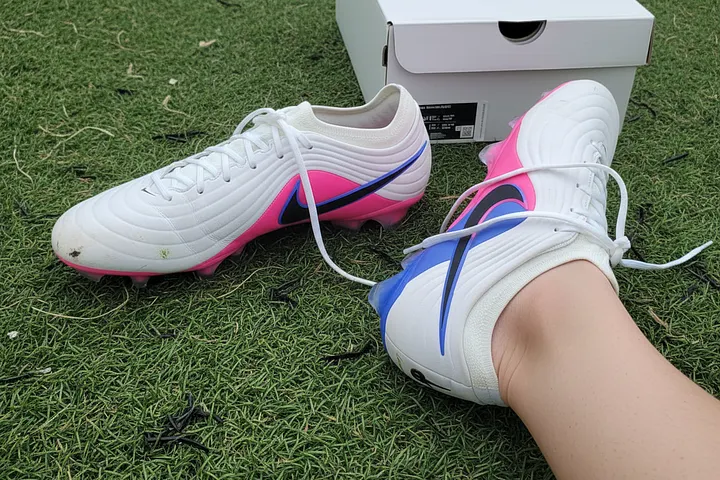
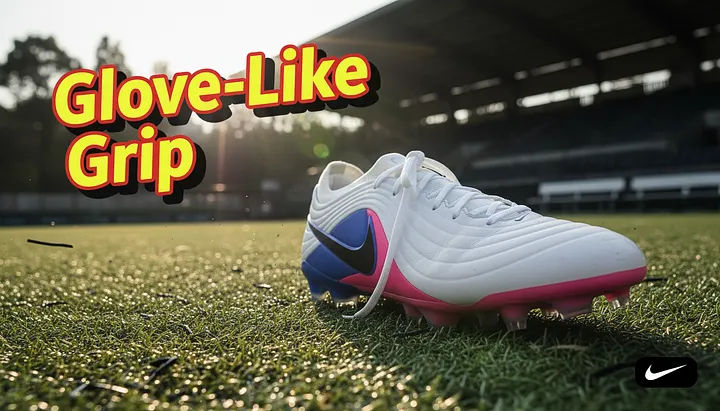
The image itself is generated with the Nano Banana image-to-image model on Fal.ai. A polling loop acts as a safety net — if the image isn't ready within the expected window, it retries fetching the generation status instead of failing outright. Here's what it produced for the Nike example:
Stage 3: Video ad generation
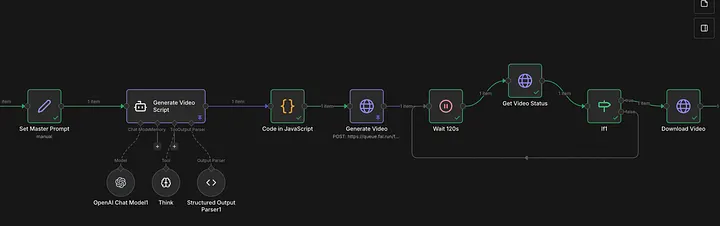
This stage outputs a video based on everything the workflow has built so far. Like Stage 2, it starts by having an AI Agent build a video prompt, and a Code node stringifies the agent's output so it's safe to pass downstream:
const structuredPrompt = $input.first().json.output.final_prompt;
return {
  json: {
    prompt: JSON.stringify(structuredPrompt), // this escapes it correctly!
  }
};
That prompt goes to Fal.ai's API to generate the video from the image, using the veo3.1 fast model — with the same Wait/If polling pattern from Stage 2 keeping track of the API response. Once it's ready, the video is downloaded via the GET request documented for that model's API.
Stage 4: Video title, description & thumbnail creation
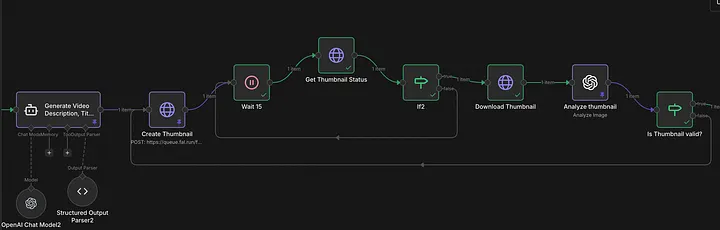
This stage produces the video's title, description, and a thumbnail prompt, from an AI Agent outputting this exact shape:
{
  "video_title": "",
  "video_description": "", // with hashtags
  "thumbnail_prompt": ""
}
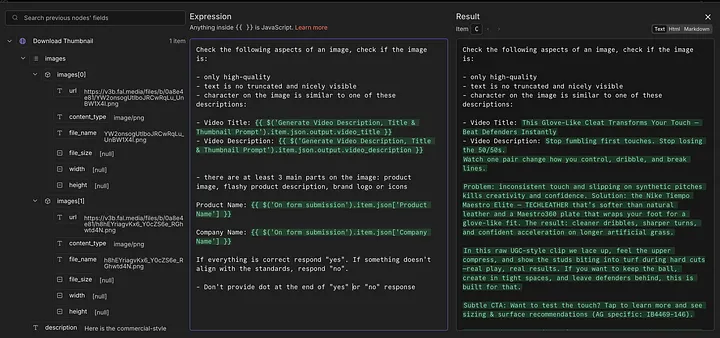
The thumbnail itself is generated with Nano Banana again, then passed through OpenAI's Analyze node to check whether it actually matches the product and meets expectations:
Stage 5: Video upload 🎥
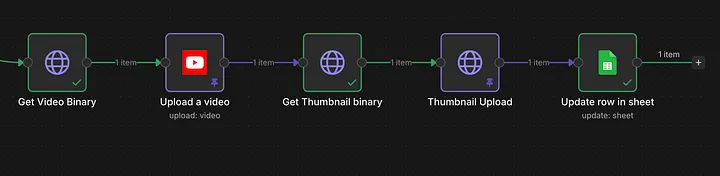
The final stage downloads the video as binary so it can be pushed to a YouTube channel. Both the video and the thumbnail need converting to binary before upload. Setting the thumbnail specifically needs a direct POST request — n8n doesn't support that natively:
- Request type: POST
- Credentials type: YouTube OAuth2 API (predefined credential type)
- URL:
https://www.googleapis.com/upload/youtube/v3/thumbnails/set?videoId=<VIDEO_ID>&uploadType=media - Headers:
Content-Type: image/jpeg - Body: n8n Binary File —
data
Everything is written back to Google Sheets for the record — and that's the full loop, from a product name and a couple of photos to a video ad, live on YouTube with its own title, description, and thumbnail.
Why this matters for businesses 💡
- ✅ Generate 50+ ad creatives daily
- ✅ Reduce production cost by 70%
- ✅ Eliminate manual editing
- ✅ Maintain brand consistency
- ✅ Scale campaigns instantly
Key takeaways
- The pipeline chains together three separate generative models — Nano Banana for images, veo3.1 for video, and an LLM agent for prompts/copy — each with its own polling loop, rather than assuming any single call completes instantly.
- A structured JSON contract between stages (image_prompt, then video_title/video_description/thumbnail_prompt) is what keeps five loosely-coupled n8n stages composable instead of one giant workflow.
- Validating the generated thumbnail against the product before publishing (Stage 4's Analyze step) is what keeps this safe to run unattended — it isn't just generate-and-ship.
- Platform quirks still need manual workarounds even in a fully automated pipeline — n8n has no native YouTube-thumbnail node, so that step is a raw authenticated POST request.
Written by Shubham Jain, Cloud Engineer at Newspresso Tech.
More posts
How I Built an AI-Powered Lead Qualification & Routing System in n8n (Production-Ready)
A webhook-driven n8n workflow that validates inbound leads, scores intent with a guardrailed AI agent, and routes each one — CRM deal, Slack ping, drafted email, or just a log line — based on how hot it actually is.
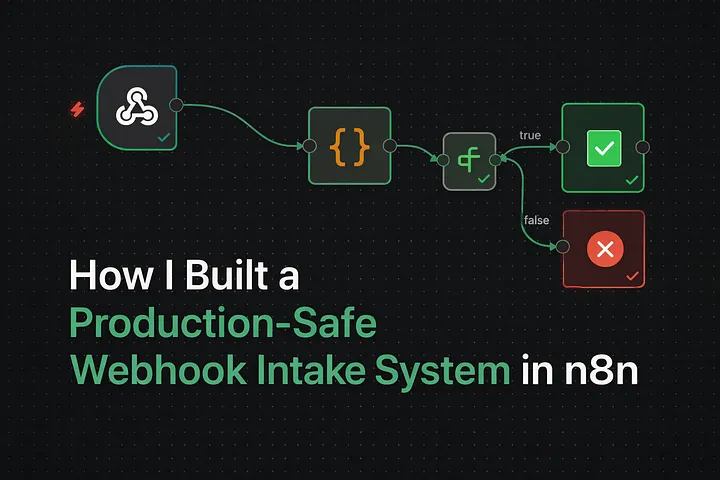
How I Built a Production-Safe Webhook Intake System in n8n
Why most automations fail before AI or CRMs ever get involved — and the defensive n8n webhook pattern that stops bad data at the door: validate, normalize, respond deterministically, no silent failures.
Improve Performance of Memory-Intensive Applications on an EKS Cluster Using Huge Pages
Why memory-heavy workloads like ML model serving get unstable under load — page table overhead, TLB misses, fragmentation — and how configuring huge pages on Karpenter-provisioned EKS nodes fixes it.