Improve Performance of Memory-Intensive Applications on an EKS Cluster Using Huge Pages

Ever wondered how to improve the performance of memory-intensive applications on a Kubernetes cluster? Some heavy applications get unstable or slow to respond simply because of how much they demand from the host. Say you're deploying a TensorFlow model on Kubernetes — you'd start hitting performance issues rooted in operational inefficiencies most people never think to look for.
Those inefficiencies typically come from three places:
- Increased memory overhead — the system has to maintain larger page tables, since the default 4KB pages are small and a memory-heavy workload needs a lot of them.
- Higher TLB miss rates — the TLB (Translation Lookaside Buffer) fills up faster because it's storing mappings for more, smaller pages; frequent TLB misses mean slower memory access.
- Risk of memory fragmentation — a model needs a large contiguous memory block, but under load, fragmented memory may not have one big enough available — leading to application crashes 💥
Huge pages solve all three. But what actually are they? 🤔
Huge Pages
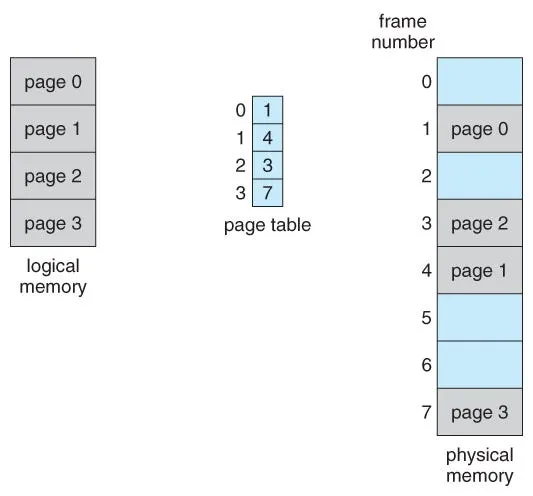
Memory management for CPU processes involves paging. A normal page is typically 4KB. A huge page, as the name suggests, is much bigger — on EKS nodes specifically, you can configure 64Ki (the default page size), 2Mi, 32Mi, or 1Gi pages. The benefits of using them:
- Reduced overhead, better performance — fewer, larger pages means a smaller page table, less memory overhead, and better overall efficiency.
- Improved application performance — in EKS, you configure containers to use huge pages via resource requests and limits, so those "reserved" pages are guaranteed to the workload that needs them — it isn't fighting other pods on the node for memory.
How to enable huge pages in your EKS cluster
This setup assumes Karpenter for node provisioning — see the guide on configuring Karpenter for autoscaling EKS nodes if you haven't set that up yet.
Once Karpenter is installed on the cluster, Amazon Linux 2 EKS nodes typically support four huge page sizes: 64K, 2M, 32M, and 1G. Configuring them means updating the node's user-data script:
# Append the number of huge pages you want, in the right folder for that huge page size
echo <total-number-of-huge-pages> > /sys/kernel/mm/hugepages/hugepages-<size-of-huge-pages-in-kb>kB/nr_hugepages

# Update the kernel parameters to specify the size and number of huge pages you want
sed -i '/^GRUB_CMDLINE_LINUX_DEFAULT=/ s/"$/ hugepagesz=<size-of-huge-pages> hugepages=<total-number-of-huge-pages>"/' /etc/default/grub

# Apply the new kernel parameters
grub2-mkconfig -o /boot/grub2/grub.cfg<total-number-of-huge-pages>— any number, sized to how much memory the node actually has.<size-of-huge-pages-in-kb>— 64 (64K), 2048 (2M), 32768 (32M), or 1048576 (1G).<size-of-huge-pages>— 64K, 2M, 32M, or 1G.
Apply that to the user-data script and huge pages are enabled on every Karpenter-provisioned EKS node from then on.
Testing
Verify huge pages actually work by deploying a pod that requests them:
apiVersion: v1
kind: Pod
metadata:
  name: hugepage-test-pod
spec:
  containers:
  - name: test-container
    image: busybox
    command: ["sleep", "3600"]
    resources:
      limits:
        memory: 2Gi
        hugepages-32Mi: 2Gi # Max 2Gi of 32Mi-sized huge pages for this pod
      requests:
        hugepages-32Mi: 2Gi # Requests 2Gi of 32Mi-sized huge pages
Then confirm the node is actually carrying that huge-page allocation:
kubectl describe node <node-name>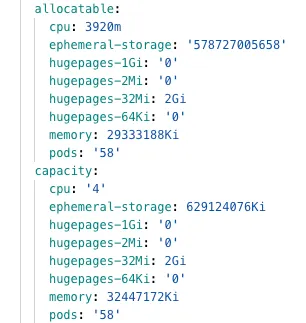
That's the full loop: configure huge pages on Karpenter-provisioned nodes via the user-data script, request them explicitly on the workloads that need them, and verify the allocation shows up on the node itself.
Key takeaways
- Memory-heavy workloads (large ML models are the clearest case) suffer from page-table overhead, TLB misses, and fragmentation risk when stuck on the default 4KB page size.
- Huge pages fix all three by using fewer, larger memory pages — less page-table overhead, fewer TLB misses, and reserved contiguous memory the workload doesn't have to fight other pods for.
- On EKS, huge pages are configured once per node (via the user-data script on Karpenter-provisioned nodes) and then requested explicitly per workload, as a resource request/limit like hugepages-32Mi.
- kubectl describe node is the source of truth for whether a node's huge-page allocation actually took — check it under both allocatable and capacity.
Written by Shubham Jain, Cloud Engineer at Newspresso Tech.
More posts

How I Built an AI-Powered Lead Qualification & Routing System in n8n (Production-Ready)
A webhook-driven n8n workflow that validates inbound leads, scores intent with a guardrailed AI agent, and routes each one — CRM deal, Slack ping, drafted email, or just a log line — based on how hot it actually is.

Building an AI-Powered Ad Generation System for Businesses 💸
An end-to-end n8n workflow that turns a product name, description, and a couple of photos into a fully edited, titled, thumbnailed video ad — uploaded straight to YouTube, no manual editing.
How I Built a Production-Safe Webhook Intake System in n8n
Why most automations fail before AI or CRMs ever get involved — and the defensive n8n webhook pattern that stops bad data at the door: validate, normalize, respond deterministically, no silent failures.