Bootstrap Solution to Cache Heavy Container Images Using DaemonSets & Karpenter in an EKS Cluster
This post covers how to build your own image-caching solution in a Kubernetes cluster using a DaemonSet and Karpenter together. It's one of a few approaches worth knowing for cutting pod startup time — see the companion post evaluating ECR Pull Through Cache, eStargz, Spegel/kube-fledged, and Bottlerocket OS for the others.
But before diving in — what actually is a DaemonSet, and what's Karpenter? 🤷🏻

What is DaemonSet?
Simply put, a DaemonSet is a set of pods that runs on every node in the cluster — 5 nodes means 5 DaemonSet pods. The best use for one, to me, is pre-configuring a node with packages, environments, or anything else it needs before the rest of your pods get scheduled onto it. That's exactly the functionality this solution leans on.
What is Karpenter?
Karpenter is a cluster autoscaler built by AWS that intelligently manages the nodes in an EKS cluster. If a pod is pending and needs a node, Karpenter provisions one for it — and it can save real money too, since it automatically consolidates nodes based on usage, unlike the vanilla Cluster Autoscaler.
This isn't a Karpenter tutorial, so I won't go deeper into Karpenter itself here — the official docs are a good place to start.
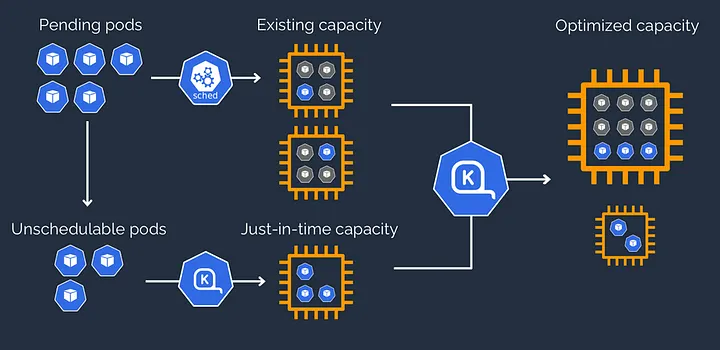
The idea here is to combine Karpenter and a DaemonSet to cache images on your nodes in an EKS cluster, cutting the startup time for the pods that actually need them. Let's go over it 💡
What's the proposal?
Scale up a tainted node using Karpenter such that no pod except the DaemonSet pods run on it. That DaemonSet then runs multiple pods on the tainted node to pull the heavy images you want cached. Finally, the DaemonSet pods untaint the node themselves, so ordinary workloads can schedule onto it — now with the images already sitting there.
Let's break that down piece by piece.
1. Scale up a tainted node using Karpenter
Karpenter can taint a node the moment it's created, via startupTaints. A node with a startup taint is tainted from birth. Here's what that looks like in a NodePool:
startupTaints:
  - key: image-caching
    value: true
    effect: NoSchedule
That effect stops any pod without a matching toleration from being scheduled on the tainted node. On to the next piece 🔨
2. Pull the heavy images via the DaemonSet
With the tainted node provisioned, configure the DaemonSet to run multiple pods — one per image you want cached — each with a toleration matching the taint, as part of an init-container's args:
kubectl run $POD_NAME --image={{ . }} --overrides='
{
  "spec": {
     "nodeSelector": {
       "kubernetes.io/hostname": "'$NODE_NAME'"
        },
      "tolerations": [
       {
        "key": "image-caching",
        "operator": "Exists",
         "effect": "NoSchedule"
         }
      ]
    }
  }'
Then loop until the pod has successfully pulled the image, and delete it once it's done:
(
  while true; do
    # Poll the pod's status and exit the loop once it's Ready or Failed
    :
  done
  kubectl delete pod $POD_NAME
)
3. Untaint the node
Last piece 🥁 — once the images are cached, untaint the node so other workloads can actually schedule onto it:
kubectl taint nodes $NODE_NAME image-caching-One thing not to skip: the DaemonSet pods need the right RBAC to pull images and taint/untaint the node. A ClusterRole like this, bound to the service account the DaemonSet runs as, covers it:
apiVersion: rbac.authorization.k8s.io/v1
kind: ClusterRole
metadata:
  name: <name>
rules:
- apiGroups: [""]
  resources: ["nodes", "pods", "services", "namespaces"]
  verbs: ["get", "list", "watch", "taint", "patch", "create", "run", "delete"]
At this point, the images are cached onto the node, and it's ready to spin up any heavy-image pod without the usual wait.
When (and why) you'd actually want this
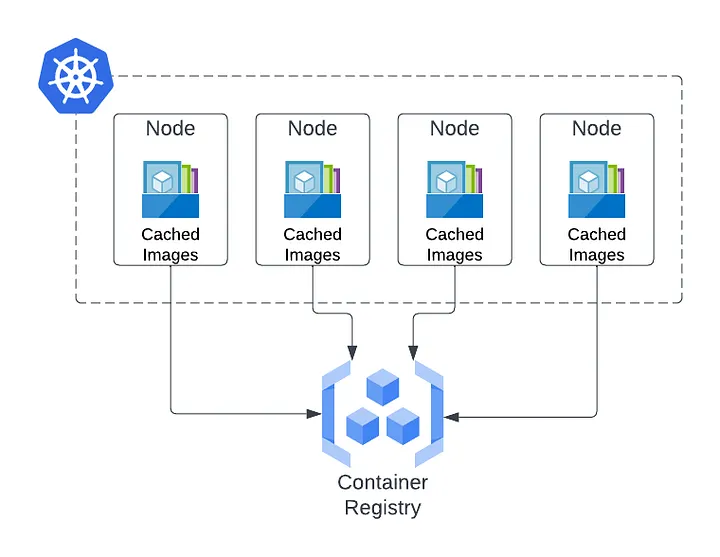
- Caching an image for the first time takes real time — baking a node with the images it needs isn't instant.
- This works best when you already know which heavy images you'll be using most often, so they're cached ahead of time and every pod that needs one skips the pull entirely.
- You can pull multiple images onto a node in parallel if you want to cut that baking time down further.
One last thought: this could be taken further with Helm — template the DaemonSet so you can just supply a list of images to cache and have them injected in, instead of hardcoding them.
Key takeaways
- A Karpenter startupTaint plus a matching DaemonSet toleration is what keeps a node reserved for image-pulling only, until it's actually ready.
- The DaemonSet does three jobs in sequence: pull the images, wait for each pull to finish, then untaint the node itself — no external controller needed.
- This is a build-your-own alternative to the pre-packaged caching options (ECR Pull Through Cache, eStargz, Spegel) — more setup, but no dependency on a third-party project's maintenance status.
- It pays off specifically when you can predict which heavy images you'll need — this bakes a node ahead of time, it doesn't help with images you can't anticipate.
Written by Shubham Jain, Cloud Engineer at Newspresso Tech.
More posts

How I Built an AI-Powered Lead Qualification & Routing System in n8n (Production-Ready)
A webhook-driven n8n workflow that validates inbound leads, scores intent with a guardrailed AI agent, and routes each one — CRM deal, Slack ping, drafted email, or just a log line — based on how hot it actually is.

Building an AI-Powered Ad Generation System for Businesses 💸
An end-to-end n8n workflow that turns a product name, description, and a couple of photos into a fully edited, titled, thumbnailed video ad — uploaded straight to YouTube, no manual editing.
How I Built a Production-Safe Webhook Intake System in n8n
Why most automations fail before AI or CRMs ever get involved — and the defensive n8n webhook pattern that stops bad data at the door: validate, normalize, respond deterministically, no silent failures.