Setting Guardrails in a K8s Cluster in a Multi-Tenant Environment 🔐
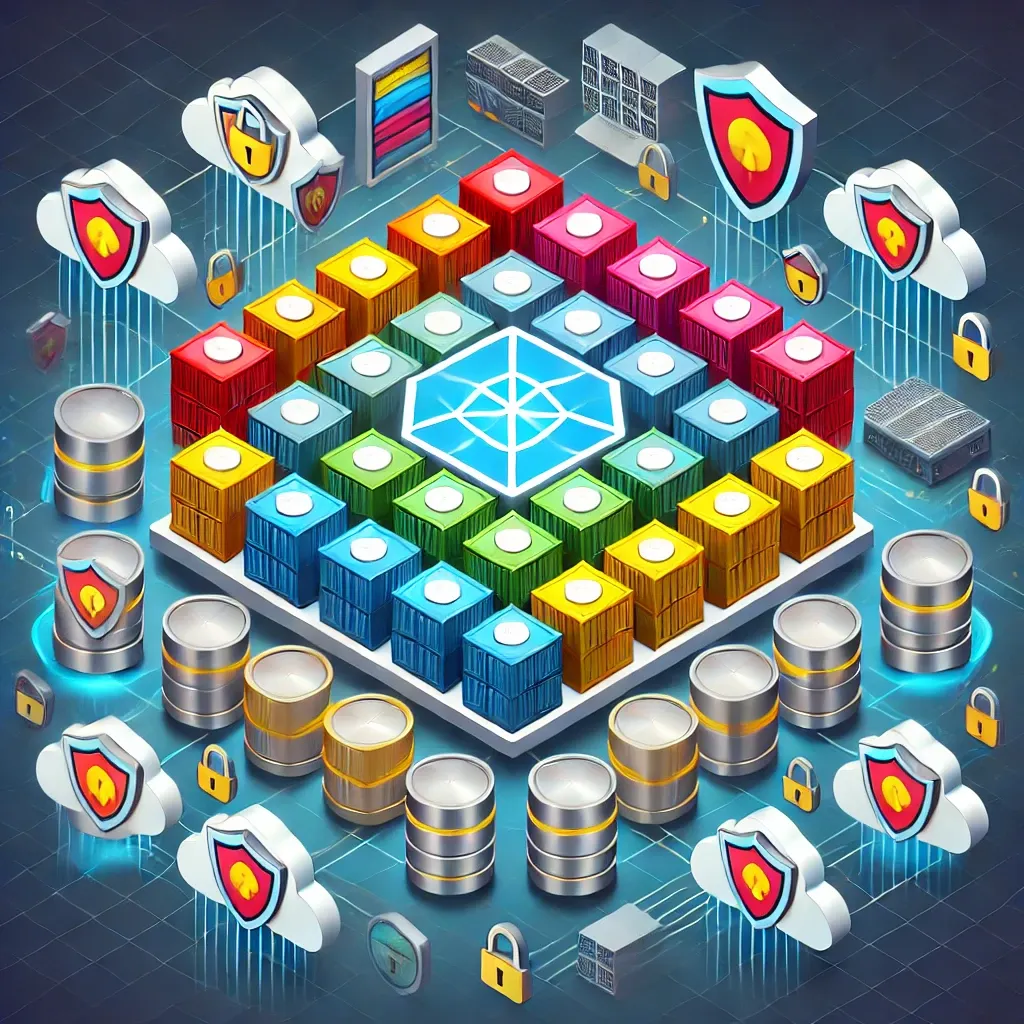
Multi-tenant clusters are essentially the way to go if you want to save costs for your organization by running multiple applications — different environments, different customers, different specs — isolated through namespaces in a single cluster. But how does that actually save money?
Mostly by not giving every team their own cluster. Onboarding everyone onto a single shared cluster means sharing resources, which saves real money that separate clusters per team wouldn't. That said, multi-tenancy comes with real downsides too — which is why I prefer it for non-production environments, and stick to a dedicated per-team cluster in production. A good rule of thumb worth reading up on before committing to either model.
To me, the biggest concern with a multi-tenant cluster is data leakage between tenants — a real problem once you're running production workloads on it. That's exactly why setting guardrails is critical for these environments: get it wrong, and it can lead to a major blow-up 💣
This post digs into how to prevent that kind of data leakage between tenants, using two tools: Kyverno and Kubernetes NetworkPolicies.
Kyverno
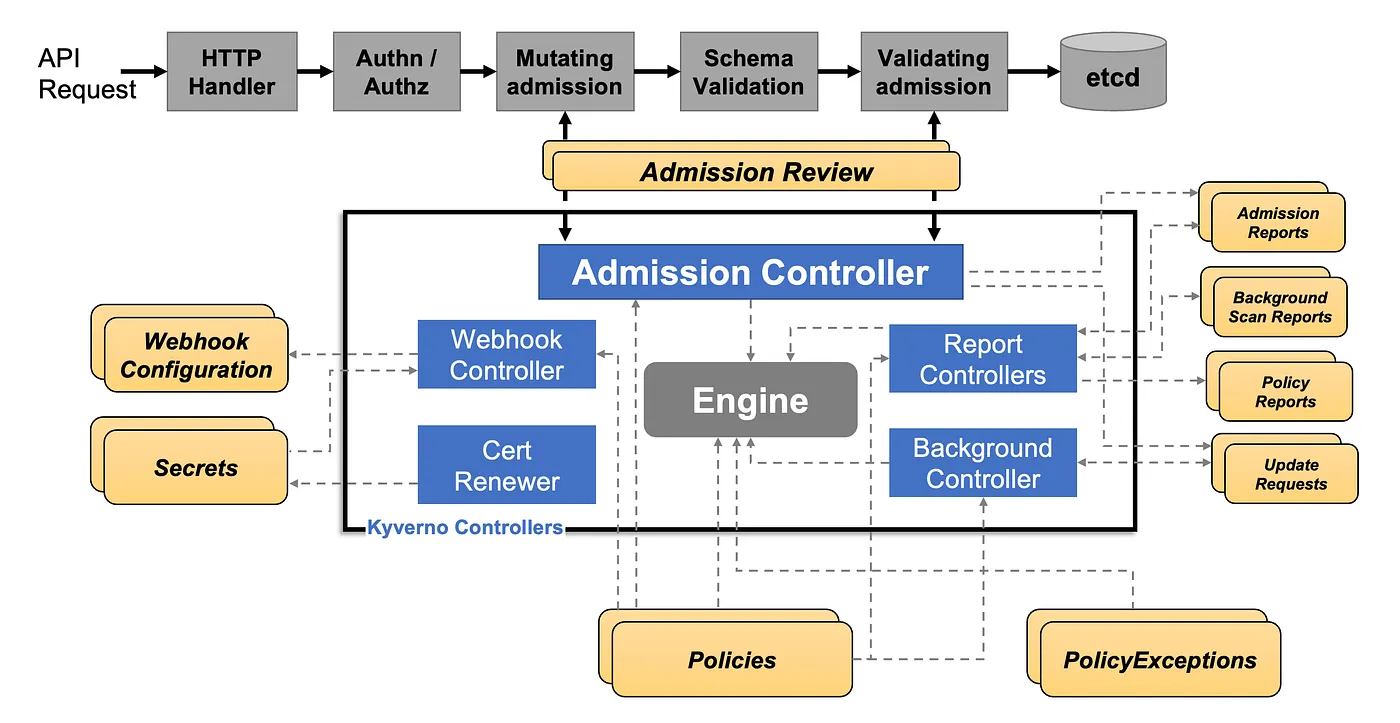
Kyverno is an open-source, Kubernetes-native policy engine built to manage, validate, and audit or enforce policies inside the cluster. Its best features:
- Policy enforcement — enforces cluster policies so workloads adhere to organizational security and operational standards.
- Generate resources — can generate additional resources like ConfigMaps or RoleBindings based on policy rules.
- Auditing — checks whether existing resources comply with new or updated policies.
Install Kyverno on an EKS cluster via Helm:
helm repo add kyverno https://kyverno.github.io/kyverno/
kubectl create namespace kyverno
helm install kyverno --namespace kyverno kyverno/kyverno
Once that's done, you should see Kyverno's core component pods running in the cluster:
- Admission controller — evaluates policies and enforces them against every request as it's made.
- Background controller — periodically scans existing resources to make sure they still comply with defined policies.
- Cleanup controller — Kyverno can generate resources as part of its policies (e.g. policy reports); this controller deletes them once they're no longer needed or no longer match the source policy.
- Reports controller — generates policy reports (
ClusterPolicyReportorPolicyReport) showing how policies are being enforced and where violations are happening.
The cluster policies
With Kyverno running, here are the policies a multi-tenant environment actually needs — and why each one exists.
First, a check-namespace-labels ClusterPolicy that requires every namespace in the cluster to carry a label. This is what lets every team's namespaces be identified as theirs in a multi-tenant environment:
apiVersion: kyverno.io/v1
kind: ClusterPolicy
metadata:
  name: check-namespace-labels
  annotations:
    policies.kyverno.io/title: Check Namespace Labels
    policies.kyverno.io/category: Other
    policies.kyverno.io/subject: Namespace
    kyverno.io/kyverno-version: <KYVERNO-VERSION>
    kyverno.io/kubernetes-version: <CLUSTER-VERSION>
    policies.kyverno.io/description: >-
      Making sure that every Namespace in the cluster has a label attached.
      The label should be of the form team-name:<YOUR-TEAM-NAME>
spec:
  validationFailureAction: <Enforce or Audit>
  background: true
  failurePolicy: Fail
  rules:
  - name: check-namespace-labels
    match:
      any:
      - resources:
          kinds:
            - Namespace
    validate:
      message: This Namespace is missing a project label.
      pattern:
        metadata:
          labels:
            team-name: "?*"
Next, either taints/tolerations on the nodes and pods, or a node selector on every pod, so workloads only ever get scheduled onto the nodes dedicated to their team — never onto some random node in the shared cluster. Here's require-node-selector.yaml:
apiVersion: kyverno.io/v1
kind: ClusterPolicy
metadata:
  name: require-node-selector
  annotations:
    policies.kyverno.io/title: Enforce nodeSelector
    policies.kyverno.io/category: Pod Best Practices (Baseline)
    policies.kyverno.io/subject: Pods
    kyverno.io/kyverno-version: <KYVERNO-VERSION>
    kyverno.io/kubernetes-version: <CLUSTER-VERSION>
    policies.kyverno.io/description: >-
      Node selector must be defined.
spec:
  validationFailureAction: <Enforce or Audit>
  background: true
  failurePolicy: Fail
  rules:
  - name: check-nodeselector
    match:
      any:
      - resources:
          kinds:
          - Pod
    validate:
      message: >-
        Pods must define a node selector block. Either add
        spec.affinity.nodeAffinity.requiredDuringSchedulingIgnoredDuringExecution.nodeSelectorTerms[*]
        or spec.nodeSelector[*]
      anyPattern:
      - spec:
          affinity:
            nodeAffinity:
              requiredDuringSchedulingIgnoredDuringExecution:
                nodeSelectorTerms: "*"
      - spec:
          affinity:
            nodeAffinity:
              preferredDuringSchedulingIgnoredDuringExecution:
                nodeSelectorTerms: "*"
      - spec:
          affinity:
            nodeAntiAffinity:
              requiredDuringSchedulingIgnoredDuringExecution:
                nodeSelectorTerms: "*"
      - spec:
          affinity:
            nodeAntiAffinity:
              preferredDuringSchedulingIgnoredDuringExecution:
                nodeSelectorTerms: "*"
      - spec:
          nodeSelector: "*"
Finally, a policy making sure every namespace in the cluster actually has a NetworkPolicy attached to it — check-namespace-networkpolicies.yaml. We'll cover what a NetworkPolicy actually does right after:
apiVersion: kyverno.io/v1
kind: ClusterPolicy
metadata:
  name: check-namespace-networkpolicies
  annotations:
    policies.kyverno.io/title: Check Namespace NetworkPolicies
    policies.kyverno.io/category: Other
    policies.kyverno.io/subject: Namespace
    kyverno.io/kyverno-version: <KYVERNO-VERSION>
    kyverno.io/kubernetes-version: <CLUSTER-VERSION>
    policies.kyverno.io/description: >-
      Making sure that every Namespace in the cluster has a network policy attached.
spec:
  validationFailureAction: <Enforce or Audit>
  background: true
  failurePolicy: Fail
  rules:
  - name: networkpolicies
    match:
      any:
      - resources:
          kinds:
          - Namespace
    exclude:
      any:
      - resources:
          namespaces: <namespaces to skip checking>
      apiCall:
        urlPath: "/apis/networking.k8s.io/v1/namespaces/{{request.object.metadata.name}}/networkpolicies"
        method: "GET"
        jmesPath: "items[] | length(@)"
    validate:
      message: "Every Namespace must have at least one NetworkPolicy."
      deny:
        conditions:
          all:
          - key: "{{ netpols }}"
            operator: Equals
            value: 0
Network Policy
A NetworkPolicy in Kubernetes controls communication between pods, and between pods and other network endpoints — it's effectively a firewall for cluster-internal traffic, letting you define exactly which traffic is allowed or denied.
apiVersion: networking.k8s.io/v1
kind: NetworkPolicy
metadata:
  name: namespace-access
  namespace: team-a-namespace
spec:
  podSelector:
    matchLabels: {}
  ingress:
    - from:
        - namespaceSelector:
            matchLabels:
                team-name: A
This policy only allows ingress traffic from namespaces carrying a specific label to reach the resources or serve requests inside the namespace allocated to that team.
That's the combination: Kyverno cluster policies to require labels, scheduling isolation, and a NetworkPolicy per namespace, plus the NetworkPolicy itself to actually enforce traffic isolation. Together, they're the guardrails that keep a security breach between tenants from ever happening in a multi-tenant cluster 🔐
Key takeaways
- Multi-tenancy saves real infrastructure cost by sharing one cluster across teams — but it also shares blast radius, so treat it as production-unsafe until guardrails are in place.
- Kyverno turns 'every namespace must be labeled / scheduled correctly / network-isolated' from a convention into an enforced, audited policy — new resources that don't comply simply get rejected or flagged.
- A per-namespace NetworkPolicy is what actually blocks cross-tenant traffic at the network layer; the Kyverno policy just guarantees one always exists.
- This combination — label policy, scheduling policy, and mandatory NetworkPolicy — is the minimum bar for running a multi-tenant cluster without one tenant being able to reach another's data.
Written by Shubham Jain, Cloud Engineer at Newspresso Tech.
More posts
How I Built an AI-Powered Lead Qualification & Routing System in n8n (Production-Ready)
A webhook-driven n8n workflow that validates inbound leads, scores intent with a guardrailed AI agent, and routes each one — CRM deal, Slack ping, drafted email, or just a log line — based on how hot it actually is.
Building an AI-Powered Ad Generation System for Businesses 💸
An end-to-end n8n workflow that turns a product name, description, and a couple of photos into a fully edited, titled, thumbnailed video ad — uploaded straight to YouTube, no manual editing.
How I Built a Production-Safe Webhook Intake System in n8n
Why most automations fail before AI or CRMs ever get involved — and the defensive n8n webhook pattern that stops bad data at the door: validate, normalize, respond deterministically, no silent failures.